I decided to get into Google's Antigravity train again. They released version 2.0 in May 2026, which I didn't have a chance to try out until my vacation when I had more time to work on side projects.
I have been experimenting with Linear to make agentic coding easier, and it has been a tremendous shift in my workflow in Cursor. So after installing Antigravity 2.0, I immediately tried installing the Linear MCP. I opened the IDE version of Antigravity and MCP store in it. I searched for Linear MCP and installed it.
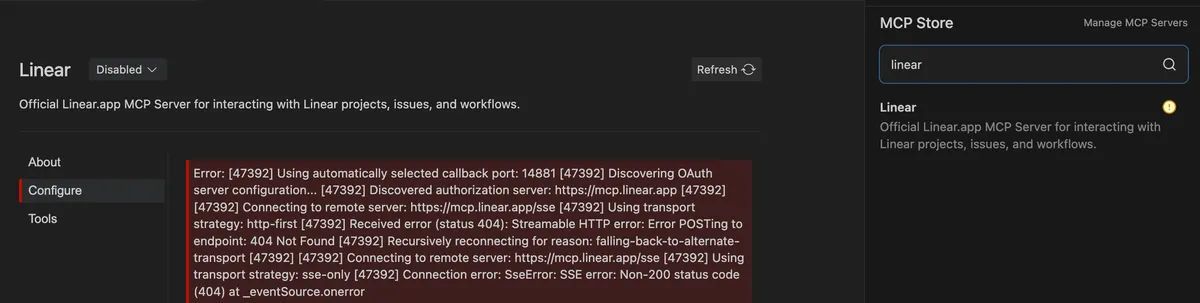
But I was met with a authorization error. Here is the exact error trace from MCP setup:
Using automatically selected callback port: 14881
Discovering OAuth server configuration...
Discovered authorization server: https://mcp.linear.app

Connecting to remote server: https://mcp.linear.app/sse
Using transport strategy: http-first
Received error (status 404): Streamable HTTP error: Error POSTing to endpoint: 404 Not Found
Recursively reconnecting for reason: falling-back-to-alternate-transport

Connecting to remote server: https://mcp.linear.app/sse
Using transport strategy: sse-only
Connection error: SseError: SSE error: Non-200 status code (404) at _eventSource.onerror
Why This Happens
Linear updated their Remote Model Context Protocol (MCP) server endpoints. The default MCP setup in Antigravity was still using the older /sse endpoint route, which has been deprecated and replaced with /mcp.
When the app attempts to connect to https://mcp.linear.app/sse, the remote server rejects the request with a 404 Not Found.
For reference, check the Linear docs.
The Fix
The fix is very straightforward: update your MCP server configuration in Antigravity IDE to point to https://mcp.linear.app/mcp.
{
  "mcpServers": {
    "linear": {
      "command": "npx",
      "args": [
        "-y",
        "mcp-remote@latest",
        "https://mcp.linear.app/mcp"
      ]
    }
  }
}
After saving your settings, reload the MCP server in your IDE. A browser window will open prompting you to complete the OAuth authorization with your Linear workspace, and you're good to go! And you can then also refresh the MCP server in the Antigravity 2.0.
Happy prompting!